If your Facebook page is not associated with a Business Portfolio, that’s OK. As long as you have admin access to your business page, the request we sent can also be accepted through Facebook Page Settings. Note: if you do have a Business Portfolio set up, our request will not be visible through Facebook Page Settings.
-
Go to Facebook.com
-
To get to your business facebook page, click on your Profile icon (in the top-right) then find and select the page to switch to it.
-
You may need to click the page again (in the top-left) to view it. You’re in the right place when you can see your business page like anyone else might see it—with the cover image on top, your facebook page profile photo, posts, etc
-
-
Find and click Settings in the left-hand menu
-
Click on Page Setup

-
If after following all steps you still don’t see a request, please see the *Important Note below.
-
-
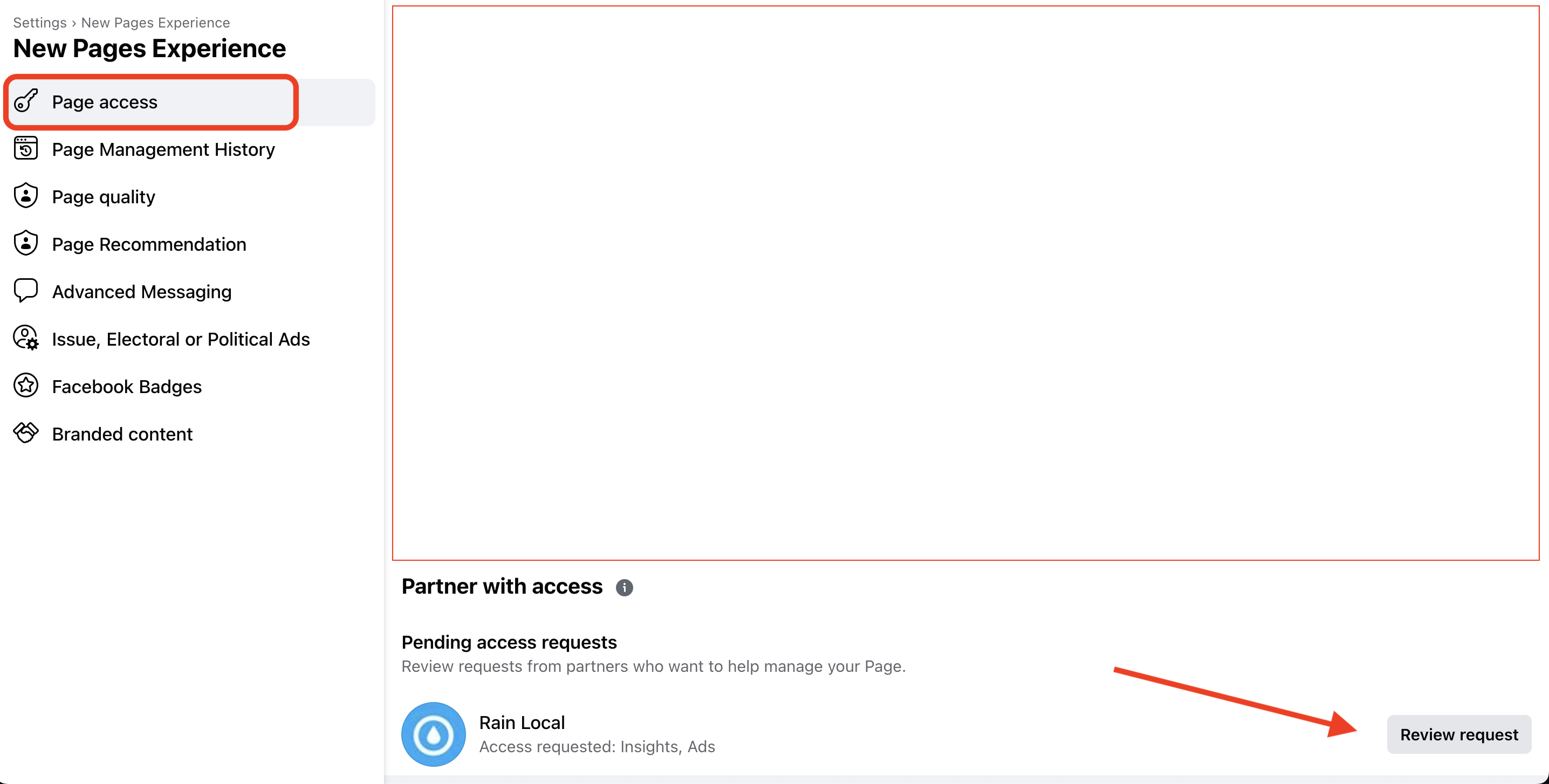
Look for “Pending access requests”
-
Click Review request, then approve it!
*Important Note: On your Page access screen, you will be able to see if a Business Portfolio is associated with your page + its ID number. You should also be able to tell if another partner already has access (eg, another agency you’ve worked with). If you’re not sure who might have admin access to your page, this may be your best lead. They’ll either have access themselves (and can provide it to you and us), or they may remember the person who granted them access originally.